



AWS CodePipeline is a continuous delivery service provided on Amazon Web Services. It creates fully managed pipelines where you can build, test and deploy your applications, completely automating the release process. CodePipeline integrates with other AWS services such as AWS CodeBuild to build your application, but also third-party tools, such as GitHub and Jenkins, for source management and building respectively. Here is a list of the third-party applications AWS CodePipeline can integrate with.
Stages of a CodePipeline
When using AWS CodePipeline, there are three main stages you can set for your pipeline: Source, Build and Deploy. Now we take a look at each one of those.
-
Source stage In the Source stage, you need to define where your code is coming from. Some options you have are:
- GitHub
- AWS CodeCommit
- Amazon S3
- Amazon ECR
It is also important to point out that CodePipeline has integration with Bitbucket Cloud in its beta version.
-
Build stage In the Build stage, you need to select what tool you are going to use to build your code. You have two options to select from:
- AWS CodeBuild
- Jenkins
CodeBuild is the preferable option, having full integration with the AWS services and maintaining the serverless pattern of your application. You can also set environment variables for your build, passing those as key-value-type to the CodeBuild instance.
-
Deploy stage In the Deploy stage, you need to specify where your instances are going to be deployed. The options available are the following:
AWS CodePipeline is highly configurable, where you can remove one of those stages if they are not needed for your application, with the exception of the source stage. You can also add stages as you wish, with the option to add multiple deploy stages for your application, where you can create multiple environments for the various steps in the deployment of your application.
This diagram from the AWS documentation demonstrates an example release process done using pipelines:
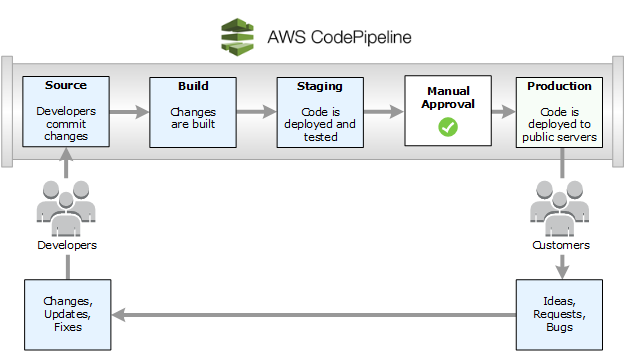
As shown in this CI/CD example, as soon as the developers commit changes to the application, they will be captured by AWS. This new code is set to then go to the build stage, where the changes will be established and therefore go to the deploy stage. In this next stage, your changes will be tested and verified after the deployment. The system admin will then get a notification that the changes were deployed, and if the launch passes the criteria set by them, they can then accept the changes and they will be live for the end-user.
We hope this post can help you get an overview of how CI/CD works with AWS CodePipeline, and how you can customize this service to get the most out of it for your projects. Take a look at the CodePipeline documentation for further details, and if you need any further information on how to integrate AWS CodePipeline into your business please do not hesitate to contact us.